Compiling custom software into a 4/32 MIPS router
Hey! I’m back again for a while, my schedule’s pretty full from school and stuff. This project had the final goal of running my own code on a router, more specifically a MIPS based TL-WR740N v6, this project was split into 6 main goals:
This router supports OpenWRT, but using their clean buildroot build and replacement toolchains would be way too boring, here we are using the vendor linux system and a custom made toolchain.
A 4/32 router means that it usually has 4MB of flash and 32MB of RAM, really limited for most stuff, but still a nice playground if you are wise, but yeah, abandoned by OpenWRT
This router is based on a QCA9533 SoC with Zentel A3S56D40GTP-50L RAM
1 - Firmware dumping
2 - Enabling debug hardware
3 - Unpacking firmware from file
4 - Repacking firmware into file
5 - Modifying embedded system into pure linux + drivers
6 - crosstool-ng setup, compiling hello world, and repacking
1 - Firmware dumping
As you may know, the first step to pretty much every hardware project is extracting your firmware, this is the easiest step that I guess you should already know.
For extracting the firmware, I have desoldered the SPI flash with hot air and put it on my CH341A, with this I managed to extract the firmware.
A different thing here was the board modifications i performed to make my work way easier
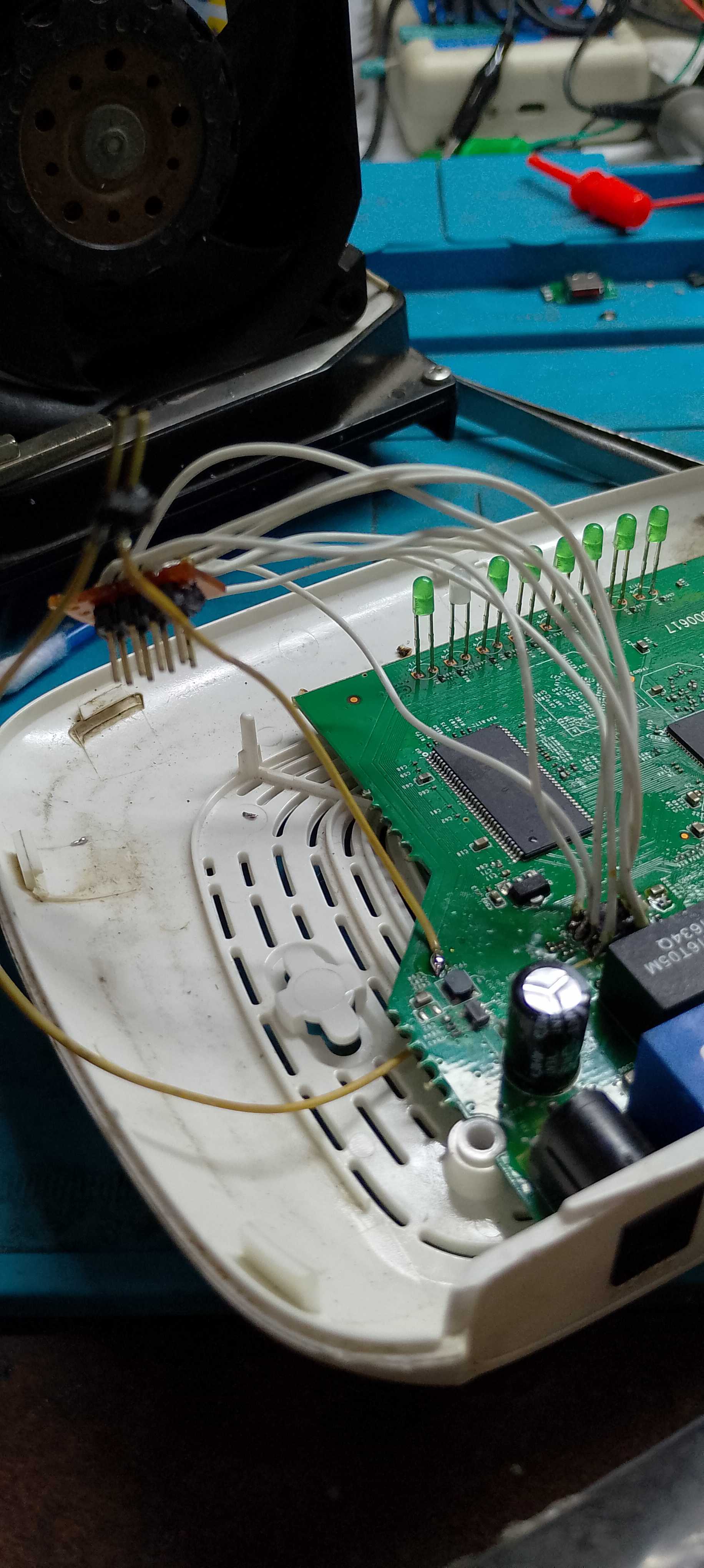
I have cut the trace that powers the SoC and connected a jumper wire to it, and I soldered an ISP connector that I can connect my CH341A directly to the PCB with the help of a few DuPont wires, this makes reflashing way more practical since I don’t need to resolder stuff every 5 minutes while tweaking firmware.
Check out this picture of the flash with a bunch of wires soldered over the it, you can see the white wires going to the ISP connector, and the yellow wires, one connected to the 3.3V test point and one going under the board, there it is connected to a cut I made on the trace that powers the SoC.
2 - Enabling debug hardware
This was an easy step, UART on this board is originally disabled, or more specifically, it IS activated on the SoC, but it doesn’t reach the UART header, to get access to UART, we need to solder two 0 ohm resistors (one to TX and one to RX) on empty pads, these pads connect the UART traces to the UART header.
This is the boot log after I cleaned the OS:
Linux version 2.6.31 (tomcat@buildserver) (gcc version 4.3.3 (GCC) ) #19 Fri May 4 20:23:43 CST 2018
Ram size passed from bootloader =32M
flash_size passed from bootloader = 4
CPU revision is: 00019374 (MIPS 24Kc)
ath_sys_frequency: cpu apb ddr apb cpu 650 ddr 393 ahb 216
Determined physical RAM map:
 memory: 02000000 @ 00000000 (usable)
Zone PFN ranges:
  Normal   0x00000000 -> 0x00002000
Movable zone start PFN for each node
early_node_map[1] active PFN ranges
    0: 0x00000000 -> 0x00002000
Built 1 zonelists in Zone order, mobility grouping on.  Total pages: 8128
Kernel command line: console=ttyS0,115200 root=31:2 rootfstype=squashfs init=/sbin/init mtdparts=ath-nor0:128k(u-boot),1024k(kernel),2816k(rootfs),64k(config),64k(art) mem=32M
PID hash table entries: 128 (order: 7, 512 bytes)
Dentry cache hash table entries: 4096 (order: 2, 16384 bytes)
Inode-cache hash table entries: 2048 (order: 1, 8192 bytes)
Primary instruction cache 64kB, VIPT, 4-way, linesize 32 bytes.
Primary data cache 32kB, 4-way, VIPT, cache aliases, linesize 32 bytes
Writing ErrCtl register=00000000
Readback ErrCtl register=00000000
Memory: 25840k/32768k available (1867k kernel code, 6928k reserved, 449k data, 120k init, 0k highmem)
NR_IRQS:128
plat_time_init: plat time init done
Calibrating delay loop... 433.15 BogoMIPS (lpj=866304)
Mount-cache hash table entries: 512

****************ALLOC***********************
 Packet mem: 80275420 (0x400000 bytes)
********************************************

NET: Registered protocol family 16
ath_pcibios_init: bus 0
***** Warning PCIe 0 H/W not found !!!
registering PCI controller with io_map_base unset
bio: create slab <bio-0> at 0
NET: Registered protocol family 2
IP route cache hash table entries: 1024 (order: 0, 4096 bytes)
TCP established hash table entries: 1024 (order: 1, 8192 bytes)
TCP bind hash table entries: 1024 (order: 0, 4096 bytes)
TCP: Hash tables configured (established 1024 bind 1024)
TCP reno registered
NET: Registered protocol family 1
ATH GPIOC major 0
squashfs: version 4.0 (2009/01/31) Phillip Lougher
msgmni has been set to 50
io scheduler noop registered
io scheduler deadline registered (default)
Serial: 8250/16550 driver, 1 ports, IRQ sharing disabled
serial8250.0: ttyS0 at MMIO 0xb8020000 (irq = 19) is a 16550A
console [ttyS0] enabled
PPP generic driver version 2.4.2
NET: Registered protocol family 24
5 cmdlinepart partitions found on MTD device ath-nor0
Creating 5 MTD partitions on "ath-nor0":
0x000000000000-0x000000020000 : "u-boot"
0x000000020000-0x000000120000 : "kernel"
0x000000120000-0x0000003e0000 : "rootfs"
0x0000003e0000-0x0000003f0000 : "config"
0x0000003f0000-0x000000400000 : "art"
->Oops: flash id 0xc84016 .
Ooops, why the devices couldn't been initialed?
TCP cubic registered
NET: Registered protocol family 10
NET: Registered protocol family 17
802.1Q VLAN Support v1.8 Ben Greear <greearb@candelatech.com>
All bugs added by David S. Miller <davem@redhat.com>
athwdt_init: Registering WDT WIFI button pressed.
success
VFS: Mounted root (squashfs filesystem) readonly on device 31:2.
Freeing unused kernel memory: 120k freed
init started:  BusyBox v1.01 (2016.06.24-04:25+0000) multi-call binary
This Board use 2.6.31
xt_time: kernel timezone is -0000
nf_conntrack version 0.5.0 (512 buckets, 5120 max)
ip_tables: (C) 2000-2006 Netfilter Core Team
insmod: cannot open module `/lib/modules/2.6.31/kernel/iptable_raw.ko': No such file or directory
insmod: cannot open module `/lib/modules/2.6.31/kernel/flashid.ko': No such file or directory
PPPoL2TP kernel driver, V1.0
PPTP driver version 0.8.3
insmod: cannot open module `/lib/modules/2.6.31/kernel/harmony.ko': No such file or directory
insmod: cannot open module `/lib/modules/2.6.31/kernel/af_key.ko': No such file or directory
insmod: cannot open module `/lib/modules/2.6.31/kernel/xfrm_user.ko': No such file or directory
Housey2K Linux Box


BusyBox v1.01 (2016.06.24-04:25+0000) Built-in shell (msh)
Enter 'help' for a list of built-in commands.

#
Here is the U-Boot boot logs + environment file:
U-Boot 1.1.4 (Sep 21 2015 - 16:15:07)

ap143-2.0 - Honey Bee 2.0

DRAM:  32 MB
Flash Manuf Id 0xc8, DeviceId0 0x40, DeviceId1 0x16
flash size 4MB, sector count = 64
Flash:  4 MB
Using default environment

In:    serial
Out:   serial
Err:   serial
Net:   ath_gmac_enet_initialize...
ath_gmac_enet_initialize: reset mask:c02200
Scorpion ---->S27 PHY*
S27 reg init
: cfg1 0x800c0000 cfg2 0x7114
eth0: ba:be:fa:ce:08:41
athrs27_phy_setup ATHR_PHY_CONTROL 4 :1000
athrs27_phy_setup ATHR_PHY_SPEC_STAUS 4 :10
eth0 up
Honey Bee ---->  MAC 1 S27 PHY *
S27 reg init
ATHRS27: resetting s27
ATHRS27: s27 reset done
: cfg1 0x800c0000 cfg2 0x7214
eth1: ba:be:fa:ce:08:41
athrs27_phy_setup ATHR_PHY_CONTROL 0 :1000
athrs27_phy_setup ATHR_PHY_SPEC_STAUS 0 :10
athrs27_phy_setup ATHR_PHY_CONTROL 1 :1000
athrs27_phy_setup ATHR_PHY_SPEC_STAUS 1 :10
athrs27_phy_setup ATHR_PHY_CONTROL 2 :1000
athrs27_phy_setup ATHR_PHY_SPEC_STAUS 2 :10
athrs27_phy_setup ATHR_PHY_CONTROL 3 :1000
athrs27_phy_setup ATHR_PHY_SPEC_STAUS 3 :10
eth1 up
eth0, eth1
Setting 0x181162c0 to 0x58b1a100
is_auto_upload_firmware=0
Autobooting in 1 seconds
ap143-2.0> printenv
bootargs=console=ttyS0,115200 root=31:02 rootfstype=jffs2 init=/sbin/init mtdparts=ath-nor0:32k(u-boot1),32k(u-boot2),3008k(rootfs),896k(uImage),64k(mib0),64k(ART)
bootcmd=bootm 0x9f020000
bootdelay=1
baudrate=115200
ethaddr=0xba:0xbe:0xfa:0xce:0x08:0x41
ipaddr=192.168.1.1
serverip=192.168.1.10
dir=
lu=tftp 0x80060000 ${dir}tuboot.bin&&erase 0x9f000000 +$filesize&&cp.b $fileaddr 0x9f000000 $filesize
lf=tftp 0x80060000 ${dir}ap143-2.0${bc}-jffs2&&erase 0x9f010000 +$filesize&&cp.b $fileaddr 0x9f010000 $filesize
lk=tftp 0x80060000 ${dir}vmlinux${bc}.lzma.uImage&&erase 0x9f300000 +$filesize&&cp.b $fileaddr 0x9f300000 $filesize
stdin=serial
stdout=serial
stderr=serial
ethact=eth0

Environment size: 684/65532 bytes
ap143-2.0>
To enter U-Boot, you need to power on the router and immediatelly start typing “tpl” on the serial terminal, props for OpenWRT for figuring that out, note that before I found out this, I went as far as trying rudimentary fault injection by bringing down the CS line on the rough timing that U-Boot reads the compressed filesystem in hopes it would fail and fallback to the shell (it didn’t, just crashed). The baud rate for U-Boot is 121212 (weird, I only figured it out because of my logic analyzer), and the baud rate for linux is 115200.
3 - Unpacking firmware from file:
For this I did some initial reckon with the help of binwalk, with that I focused mainly on the squashfs partition near the end of the file. This is the binwalk output:
~/tlwr740n$ binwalk firmware.bin

DECIMAL       HEXADECIMAL     DESCRIPTION
--------------------------------------------------------------------------------
12912         0x3270          U-Boot version string, "U-Boot 1.1.4 (Sep 21 2015 - 16:15:09)"
12960         0x32A0          CRC32 polynomial table, big endian
14272         0x37C0          uImage header, header size: 64 bytes, header CRC: 0x3E48BFB3, created: 2015-09-21 08:15:10, image size: 35753 bytes, Data Address: 0x80010000, Entry Point: 0x80010000, data CRC: 0x83137F22, OS: Linux, CPU: MIPS, image type: Firmware Image, compression type: lzma, image name: "u-boot image"
14336         0x3800          LZMA compressed data, properties: 0x5D, dictionary size: 33554432 bytes, uncompressed size: 93336 bytes
131072        0x20000         TP-Link firmware header, firmware version: 0.0.3, image version: "", product ID: 0x0, product version: 121634822, kernel load address: 0x0, kernel entry point: 0x80002000, kernel offset: 3932160, kernel length: 512, rootfs offset: 849336, rootfs length: 1048576, bootloader offset: 2883584, bootloader length: 0
131584        0x20200         LZMA compressed data, properties: 0x5D, dictionary size: 33554432 bytes, uncompressed size: 2495224 bytes
1179648       0x120000        Squashfs filesystem, little endian, version 4.0, compression:lzma, size: 2789026 bytes, 589 inodes, blocksize: 131072 bytes, created: 2018-05-04 12:02:11
And this is the mtdparts from U-Boot environment file:
32k(u-boot1)
32k(u-boot2)
3008k(rootfs)
896k(uImage)
64k(mib0)
64k(ART)
The format apparently is <size>(<name>)
I extracted it with dd and ran unsquashfs on it so I could take a look at the filesystem. After that I pieced together a little shell script to automatically extract the partition from the original file.
Here is the script I used:
#/bin/sh
dd if=firmware.bin of=hsqs.bin bs=1 skip=1179648
unsquashfs hsqs.bin
4 - Repacking firmware into file:
This step was easy, I basically made a simple shell script that runs mksquashfs on the folder that was extracted before, copies the original file and replaces the squashfs section with our own
This is the script I used, I was lazy that day so I used ChatGPT to write it and just changed some stuff:
#!/bin/sh

FW_IN="firmware.bin"
FW_OUT="new_firmware.bin"

ROOTFS_DIR="squashfs-root"
NEW_FS="new_squashfs.bin"

OFFSET=1179648
ORIG_SIZE=2789026

echo "[1] Rebuilding squashfs..."

mksquashfs "$ROOTFS_DIR" "$NEW_FS" \
    -comp lzma \
    -b 131072 \
    -noappend

if [ $? -ne 0 ]; then
    echo "mksquashfs failed"
    exit 1
fi

NEW_SIZE=$(stat -c%s "$NEW_FS")
echo "New size: $NEW_SIZE (orig: $ORIG_SIZE)"

if [ "$NEW_SIZE" -gt "$ORIG_SIZE" ]; then
    echo "WARNING: new squashfs is bigger than original!"
    #exit 1
fi

echo "[2] Padding squashfs..."

PADDED_FS="padded_fs.bin"
cp "$NEW_FS" "$PADDED_FS"

PAD_SIZE=$(($ORIG_SIZE - $NEW_SIZE))
dd if=/dev/zero bs=1 count=$PAD_SIZE >> "$PADDED_FS" 2>/dev/null

echo "[3] Injecting into firmware..."

cp "$FW_IN" "$FW_OUT"

dd if="$PADDED_FS" of="$FW_OUT" bs=1 seek=$OFFSET conv=notrunc

echo "Done → $FW_OUT"
5 - Modifying embedded system into pure linux + drivers
This step and step 6 had a lot of aid from AI stuff I have been doing, here I just gave tree to ChatGPT and told it to give me a rm -rf command to remove stuff related to the router software that’s not the drivers or linux filesystem itself
The next step was to modify the boot script located at /etc/rc.d/rcS.
I cleaned it and removed a few unecessary commands, removed the original router software, known as /usr/bin/httpd.
The next step was changing a line on /etc/inittab that was originally ::respawn:/sbin/getty ttyS0 115200, I changed it for ttyS0::respawn:/bin/sh, this way it will boot straight into the shell, and I don’t need to figure out user and maybe password for the original login prompt.
After these steps and some init script fun, I got a blank linux device to play with.
Here are a few pics from putty:
1 - Dumb ahh branding
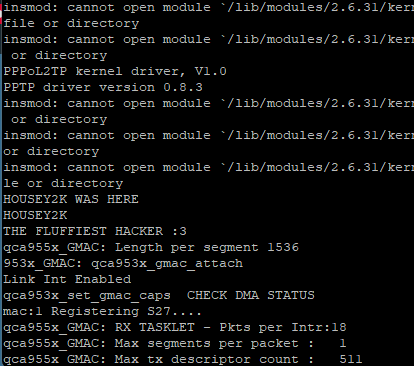
2 - HouseY2K Branding + login prompt from getty

Also I decided to load httpd into Ghidra, I’d reverse engineer it, but check this out:
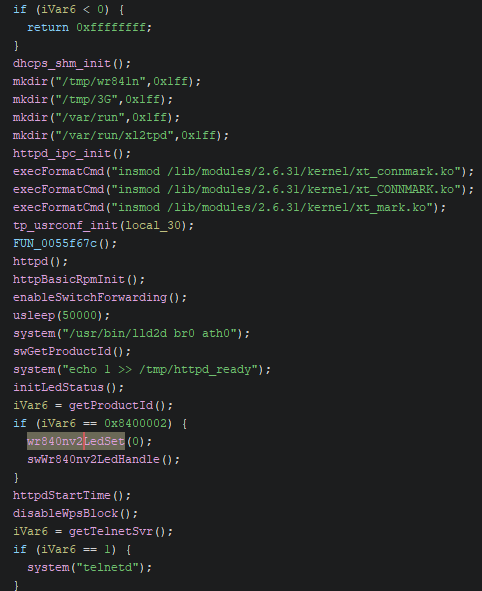
It’s full of symbols :D
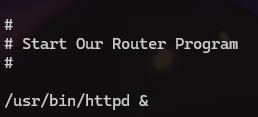
Another thing that is really cool in my personal opinion is that on the boot script it originally said “Start Our Router Program”, it’s more human compared to “Init Router Daemon” or smth
6 - crosstool-ng setup, compiling hello world, and repacking
This section is mostly AI powered, but some stuff had to be configured manually, because everything on this router is so damn old it wasn’t even an option on crosstool-ng, so I had to use the oldest option available and do a static build
I began with the command file bin/busybox inside my squashfs-root folder.
This is the output I got:
~/tlwr740n/squashfs-root$ file bin/busybox
bin/busybox: ELF 32-bit MSB executable, MIPS, MIPS32 rel2 version 1 (SYSV), dynamically linked, interpreter /lib/ld-uClibc.so.0, no section header
This is already really valuable info, we know our CPU and library
Another really important infomartion is the linux version present on the UART boot log: 2.6.31
This will be important when putting info into the crosstool-ng config
Then I ran readelf -h bin/busybox
With that I got the following data:
~/tlwr740n/squashfs-root$ readelf -h bin/busybox
ELF Header:
  Magic:   7f 45 4c 46 01 02 01 00 00 00 00 00 00 00 00 00
  Class:                             ELF32
  Data:                              2's complement, big endian
  Version:                           1 (current)
  OS/ABI:                            UNIX - System V
  ABI Version:                       0
  Type:                              EXEC (Executable file)
  Machine:                           MIPS R3000
  Version:                           0x1
  Entry point address:               0x405240
  Start of program headers:          52 (bytes into file)
  Start of section headers:          0 (bytes into file)
  Flags:                             0x70001007, noreorder, pic, cpic, o32, mips32r2
  Size of this header:               52 (bytes)
  Size of program headers:           32 (bytes)
  Number of program headers:         9
  Size of section headers:           0 (bytes)
  Number of section headers:         0
  Section header string table index: 0
This is more good information, with everything we know, this is a big-endian mips32r2 CPU running Linux 2.6.31 on uclibc.
By running ls lib we get the following info:
~/tlwr740n/squashfs-root$ ls lib
ld-uClibc-0.9.30.so  libip4tc.so        libiw.so.29           libpthread.so.0      libwpa_common.so
ld-uClibc.so.0       libip4tc.so.0      libm-0.9.30.so        libresolv-0.9.30.so  libwpa_ctrl.so
libc.so.0            libip4tc.so.0.0.0  libm.so               libresolv.so         libxtables.so
libcrypt-0.9.30.so   libip6tc.so        libm.so.0             libresolv.so.0       libxtables.so.2
libcrypt.so.0        libip6tc.so.0      libmsglog.so          librt-0.9.30.so      libxtables.so.2.1.0
libdl-0.9.30.so      libip6tc.so.0.0.0  libnsl-0.9.30.so      librt.so             modules
libdl.so.0           libiptc.so         libnsl.so             librt.so.0           pkgconfig
libexec              libiptc.so.0       libnsl.so.0           libuClibc-0.9.30.so
libgcc_s.so          libiptc.so.0.0.0   libpthread-0.9.30.so  libutil-0.9.30.so
libgcc_s.so.1        libiw.so           libpthread.so         libutil.so.0
And new stuff! Now we also know its uclibc verions 0.9.30, so legacy uclibc (not uclibc-ng!)
With all this info we have gathered, we can start by loading a crosstool-ng preset.
For that I ran ct-ng list-samples | grep "mips" and among the available options I selected mips-unknown-linux-uclibc.
From there I enabled “Use obsolete features”, typed “mips32r2” into “Architecture level”, typed “qca9533” into “Tuple’s vendor string”, Linux 2.6.31 was not available, so I selected 2.6.32.71 since it was the oldest option available. and for the C library, Legacy uClibc is also not available, so I had to select uClibc-ng 1.0.25 since it was the oldest option available, and do a static build (or I can transfer the lib from the toolchain files to /lib on the squashfs folder). I also selected the oldest gcc version that was 4.9.4 and the oldest version of binutils that was 2.26.1
Note that for this project I used crosstool-NG 1.28.0.35_14025c5 since it was the latest version
The configuration file is available for download here
This was the command I used to compile the binary: ~/x-tools/mips-qca9533-linux-uclibc/bin/mips-qca9533-linux-uclibc-gcc -static test-hello.c -o test
With the binary compiled, I put it inside /bin, ran the repack, and flashed the new image, then when I tested it and it ran I felt awesome:
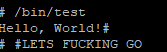
And that basically concludes this project, I may play with this router a bit more, some stuff I still haven’t tried is transfering the libs from the toolchain to the /lib folder so I don’t need to static build every time. Also if you read through this whole thing, I’m really thankful, if you have any questions or suggestions contact me through my discord @housey2k
Edit: I transfered the libs from the toolchain into linux and it didn’t work, it caused a kernel panic on boot, I should have expected that XD
Also, here is the code that controls GPIO, it only blinks the first LED, I haven’t really worked on figuring out every GPIO, I just copied this from Ghidra:
#include <stdio.h>
#include <sys/types.h>
#include <stdbool.h>

int DAT_005a2390;
int DAT_005bba10;

int FUN_004b8f24(void) { //open_device
  int sucess;

  DAT_005a2390 = open("/dev/ar7100_gpio_chrdev",2); // O_RDWR
  sucess = 0;
  if (DAT_005a2390 == -1) {
    puts("open device ar7100_gpio_chrdev failed");
    perror("open device ar7100_gpio_chrdev failed\n");
    sucess = 0xffffffff;
  }
  return sucess;
}

void FUN_004b8fa4(ulong param_1,int param_2) {//set_gpio
  int iVar1;
  int local_res4 [3];

  local_res4[0] = param_2;
  if ((0 < DAT_005a2390) || (iVar1 = FUN_004b8f24(), -1 < iVar1)) {
    ioctl(DAT_005a2390,param_1,local_res4);
  }
  return;
}

int main() {
   // printf() exibe a string entre aspas
   printf("Hello from GPIO");
   uint uVar2;
   uVar2 = 1;
   while (true) {
      uVar2 = uVar2 ^ 1;
      FUN_004b8fa4(0x8004b20a, uVar2);
      sleep(1);
}
   return 0;
}